Showing posts with label Tricks. Show all posts

Friday, January 6, 2012

What is Captcha???


Completely Automated Public Turing test to tell Computers and Humans Apart

A CAPTCHA is a type of challenge-response test used in computing as an attempt to ensure that the response is generated by a person. The process usually involves one computer (a server) asking a user to complete a simple test which the computer is able to generate and grade. Because other computers are supposedly unable to solve the CAPTCHA, any user entering a correct solution is presumed to be human.


Applications Of Captcha


Preventing automated software from performing action
CAPTCHAs are used in attempts to prevent automated software from performing actions which degrade the quality of service of a given system, whether due to abuse or resource expenditure. CAPTCHAs can be deployed to protect systems vulnerable to e-mail spam, such as the webmail services of Gmail, Hotmail, and Yahoo! Mail.
Preventing automated posting
CAPTCHAs are also used to minimize automated posting to blogs, forums and wikis, whether as a result of commercial promotion, orharassment and vandalism. CAPTCHAs also serve an important function in rate limiting. Automated usage of a service might be desirable until such usage is done to excess and to the detriment of human users. In such cases, administrators can use CAPTCHA to enforce automated usage policies based on given thresholds. The article rating systems used by many news web sites are another example of an online facility vulnerable to manipulation by automated software.
Preventing Dictionary Attacks. 
CAPTCHAs can also be used to prevent dictionary attacks in password systems. The idea is simple: prevent a computer from being able to iterate through the entire space of passwords by requiring it to solve a CAPTCHA after a certain number of unsuccessful logins.

What is 1g 2g 2.5g 3g 3.5g 3.75g 3.9g 4g Check the difference explained

GSM means Global
System for Mobile
Communications

In 1982
1G
First Generation
was introduced where
network signals were
analogue and used
Frequency Division Multiple Access (FDMA)

2G
Second Generation waslaunched in 1992 in which
signals and speech
channels were digitally
encrypted. 2G used Time
Division Multiple Access (TDMA)

2.5G
Deployed in 2003
which implemented High
Speed Circuit Switched Domain(HSCSD) Data rate
236.8kbps to 384kbps by using Enhanced Data Rate
for GSM Evolution (EDGE)

3G
has very different
functions like it allows
simultaneous use of speech
and data services at higher
rates and better spectral
efficiency.

3G Standard International Mobile
Telecommunications
IMT-2000 which is
popularly known as 3G
or 3rd Generation standard for mobile phones and telecommunications services to make 3G globally applicable.

3G UMTS Universal Mobile
Telecommunications
System uses W-CDMA
WideBand-Code Division
Multiple Access as main
interface. Also known with other names. In
Japan called FOMA
Freedom Of Mobile
Multimedia Access. In
China known as TD-
SCDMA Time Division- Synchronous Code
Division Multiple Access.
Basically all these are
variants which uses
different radio
interface. W-CDMA networks can
give speed upto
384kbps maximum.

3.5G
HSUPA upgrades the uplink for higher
data transfer speed and
capacity of 1.4 ,1.9 ,5.8
Mbps.

HSUPA name is given by Nokia and used in its phones only
but 3GPP does not
support this name.
HSDPA High-Speed
Downlink Packet Access
having faster speed from 1.8 ,3.6 ,7.2 to 14
Mbps.

3.75G
HSPA High Speed Packet Access is a
combination of HSUPA
and HSDPA that
improves the
performance of W-
CDMA and can attain speed 21Mbps to
28Mbps. HSDPA High-Speed Downlink Packet Access
having faster speed
from 1.8 ,3.6 ,7.2 to 14
Mbps.

3.9G HSOPA Some networks dubbed it as
4G. This project is
known as Long Term
Evolution and uses OF-
DMA Orthogonal
Frequency-Division Multiplexing which will
offer data rate at
170Mbps for up-link
and 320Mbps for down-
link.

4G Constitute of 4G has not been standardized
yet.It is non-backward
compatible with new
higher frequencies
bands. It is defined to
be comprehensive and secure for the users. 4G
will only be packet-
based (all-IP) switched
network. Facilities like
IP-telephony (IP-based
voice data), Ultra- broadband internet Access 1GBps (Gigabit
speed) Support for IPV6
protocol, Gaming
Services, High Definition
HDTV, Streamed
Multimedia and many more new services are
added!!! UMTS operates on
frequencies of
850/900/1700/1900/2100
MHz. Most 3G phones
support at least 2
frequencies. No 3G phone available which supports all 3G
frequencies.
It depends on service
provider what speed
and frequency it adopts
for its 3G network and what type of 3G
compatible phone you
have to fully
exploit ,utilize and
enjoy the services

Send SMS anywhere in WORLD ===> 100% WORKING


Send free sms anywhere in world .... it works for me& got my message delivered in less than10 seconds.


http://smstexter.com/index.php

http://www.fakesms.in/

http://www.ofsms.in/

Thursday, January 5, 2012

Earn 5 Dollar Daily Sitting At Home


Well I am been noticing that people are struggling to earn some $$$ online. For that, either they are working with PTC and some guys working on Bux sites. But i must tell you guys that they sucks big time. ;)
So i took some of my time and had written this small tutorial for these communities to earn some good $$$ online working with very little efforts!! :)
Well i am talking about a new site which you guys might even head of. But it may be new for many.
This site is a basic buy/sell site where people offer their services for just 5$. So you guys can also go there and offer whatever you can for 5$. Buyers come mainly from US,UK,Canada!!
Some popular services you can offer :
* Create a Logo for 5$
* Create a banner for 5$
* Write a 500 works unique article for 5$
* Record an audio speech for 5$
* Convert videos to any format for 5$
* Create a PPT presentation for 5$
* Write a code which can take max. 1 hour for 5$
* Can do some research on any topic for 5$
Install the wordpress for 5$
* Blog Commenting for 5$
Just go ahead and offer anything you can do in less time and worth 5$!!! See there for more examples!!
Site deducts 20% of each job you do. They call it a GIG as your service. So in real they are taking 5$ from buyer and in return you will get 4$ out of it.
Also, It takes 15 days to withdraw. Its becoz of Credit Card cycle process which gets finished in 15 days. So after that the buyer cant charge back!!
So if you made 4$ today and 4$ tomorrow then you can withdraw both on 15th and 16th day starting from today.
I hope its easy and clear till now???
Remember, You can promote your GIG’s (services) on twitter,facebook,myspace or anywhere you want or also can make a blog for your GIG’g and can promote or spam it aimlessly to get more and more traffic.
If you get a lot of Reviews then your GIG will be made FEATURED and will be displayed on front page and thus more and more orders!! :D
This is the most easy $$$$ you can earn…remember to give them a clear description in your GIG of what you are going to do and use a relevant pic. Also, Use maximum 3 keyworks like this keyword1 keyword 2 keyword 3!!
Withdrawl via PayPal only!! :)

Saturday, December 24, 2011

Google Adsense Approval Trick


Google Adsense is a ads Service run by google and one of the best way of earning online for bloggers and Webmasters. But Getting approval for adsense is not a easy job, so today i am going to post simple and geniue way of getting adsense Approval.


Step 1 – First Create a new Gmail Id.


Step 2 – Create a You Tube Account with that new Gmail Id.


Step 3 – Upload 2-3 Video’s on You Tube .


Step 4 – Get Around 300-400 Views for Video’s.


Step 5 – After getting 300-400 Views You Tube will Offer Partnership program, accept it for adsense and create new adsense Account icon smile 

Thats It :)

How To Download You Tube Videos Without Any Software

To Download Videos From You Tube Just Add ok infront of Its URL..
Cant Understand????
 
Consider 
http://www.youtube.com/watch?v=wXSEzag7IVE
 Now Jusk Add Ok Like This
http://www.okyoutube.com/watch?v=wXSEzag7IVE
And Then Press Enter
Thats All....!
 

Making Money From Blog

Making money from our blogs is an important goal for alot of bloggers,
but most of us invested alot of time and may so money too,
but usually we disappoint with the results.
and always ask, What is the best way to make money from our blogs,
And what we all should know is that the answer is not the same for every single person and blog.
But we can try to list the best and easiest ways to make money,
at this article, i’ll just list it, but latter in my next articles, i’ll talk about the ways in more detailed tutorials.
and here is the 5 ways,
 
1. Advertising Programs
This is one of the most used ways to make money because it’s too easy to add it to your blog, and the most famous advertising Program is Google Adsense.
this programs is easy because you don’t have to do any thing but adding the program code to your blog, and then work on placement and traffic.
Other Advertising Programs
- Chitika
- Adbrite

2. Affiliate Marketing

This programs is working in many ways,they provide you a banner that you can place on your blog, so your visitors can visit it, and your can earn if your visitors sign up for a website or Buy something for example , this programs give you a commission from 5% Up to 75% per lead.

Affiliate Marketing companies
- Commission Junction
- LinkShare
- Click Bank

3. Place a Donation Link or Button on Your Blog
and this way depends on your blog visitors, and how your blog useful for the visitors,
it won’t make you get alot of money but it may help you getting few dollars,

4. Sell Products On your blog.
you can sell related products on your blog if you have got good amount of traffic, and this way is great when your concentrate on one niche.
you can sell e-books, soft wares, download able products,
and more,
you may sell your own products or other people products.

5. Sell Advertising Space On Your Blog.
This is a great way for making money and guaranteed way, because it’s easy and one step way, just try to sell your spaces and relax for next 30 days.
You may Use to have a good chance to sell your spaces like:
- BuySellAds.com

Make Your Mobile Number As Not Reachable!


Make Your Mobile Number As Not Reachable!
*** No need remove sim or battery***
Make Your Mobile Number As Not Reachable!We sometimes don't
want to receive calls at a particular time. But the caller understands that we are not receiveing call.
So make your phone as unreachable and the caller will
thought that its a network
problem. No need of removing sim card!
Lets start the game!
Make Your Mobile Number As Not Reachable!We sometimes don't want to receive calls at a particular time.
But the caller understands that we are not receiveing call.
So make your phone as unreachable and the caller willthought that its a network problem.
No need of removing sim card!Lets start the game!
Go to Menu; Settings; Phone;Operator selection; Manual!
Now your phone will search for available operators.
Select any other network except your own network
(i.e. If you are using Airtel, select vodafone in).
You'll get an error message No network access!
Now look at the signal bar. It is empty!
But dont press back. If you press back, the phone will capture signal again.
If any caller call you then, he will hear that your phone is out of network range!
This trick works on almost every phone

How to find invisible friends in GTalk


Here is the simple trick to find the friends who are online in Google talk but appearing offline.
Follow these steps to check who all are in invisible state.
  1. Open the Chat window by clicking your friend’s name
  2. Click you friends name and select “Go off the Record”.
  3. Send some message to that user.
  4. if you get the feedback from gtalk that “User is offline and can’t receive messages” in red color means that the user is really offline.
  5. But if you get no response that means that the user is appearing offline and in invisible mode.

How To Add Custom Domain Name For Blogger Blog


Blogger offers two free publishing options for your blog: hosting on Blogspot (example.blogspot.com) and hosting on your own custom domain (www.example.com or foo.example.com). You can change your publishing option at anytime, and your content will always remain unaltered regardless of which of these options you choose.Now I Am Going To Say How To Configure A Domain Bought Out Side

  1. Find the control panel on your domain registrar’s website, and locate your DNS (Domain Name System) settings. In order to link your blog to your custom domain, follow the instructions below to enter your "CNAME" and "A-records."
    CNAME
    Where it says Name, simply enter "www" and list ghs.google.com as the Host Name. See our detailed instructions on providing CNAMEs for various registrars. If yours isn't listed, or if you run into other difficulties, contact your registrar directly and they can help you out.

    A-records (optional)
    The following action links your naked domain (example.com) to your actual site (www.example.com). If you skip this step, visitors who leave off the "www" will see an error page.

    Enter your domain name in the format example.com, and list the I.P. addresses shown below in the "A" section. You'll need to create four separate A-records which point to four different Google IPs. 216.239.32.21
    216.239.34.21
    216.239.36.21
    216.239.38.21

  2. Update your Blogger settings
    Before you move onto this step, wait about an hour for your DNS settings to activate. If you attempt to change the publishing settings before the DNS changes activate, then we'll let you know with a warning message.
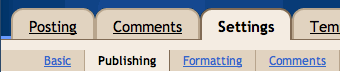
    Now it’s time to make sure Blogger knows about your custom domain so that Google can direct readers to your blog. To get started, click on the Settings  Publishing tab in Blogger.             


Then click the link that allows you to switch to a custom domain.
 
The Blogspot Address setting now changes to Your Domain. Write in your new URL (www.example.com), and save your settings. If you do not enter the "www," you will receive an error message.

you’re all set!
Some helpful notes:

  • If your new domain isn't taking you to your blog, wait another day or two to make sure all the DNS servers have been updated. If it still isn't working, contact your registrar to make sure you entered the DNS settings correctly.
  • Your original Blogspot address will automatically forward to your new domain. That way, any existing links or bookmarks to your site will still work.
  • Your posted images will continue to display on your blog.

Earn Money By Reading SMS


There Are Many Ways to Earn Money By Just reading Messages Coming To Our Mobile...
i Am postings 10 Ways To Earn Through This :)


1. MGINGER (Highly Recommended)
Earn money for reading sms on your mobile
Get SMS ads of only those products that you want to buy
Get ads at your convenience
Save money through discount coupons and offers
Earn much more money by inviting family and friends
Get 20 paisa for every ad you receive
Get 10 paisa for every ad your friends receive
Get 5 paisa for every ad your friend’s friends receive
Accumulate Rs.300 & receive a cheque
Really it’s a new concept to earn extra income through our cell phones without spending any thing.
These ads are only about your interests. Not only that, you get to decide when you want these ads.
JOIN MGINGER

2. MGARLIC
MGarlic pays you money to receive text SMS ads on your mobile.
They also pay you for each SMS that your friend or friend of your friend referred to MGarlic by you receive.
Member Benefits
Choose interests about which you want to receive SMS and get paid for it.
You decide maximum number of SMS you want to receive in a day.
Save Money by using discount coupons offered by Advertisers.
JOIN MGARLIC

3. SMS2INDIA
Earn money from SMS as well as e-mail, benefit from both in equal manner.
Earn equal amount at each network level, for both SMS and e-mail.
Earn from increasing your network. Up to 2 levels.
Check the advertisements at your own convenience. No more bombardment of advertisements.
Receive discounts/coupons/offers of your interest in your inbox.
Special privilege and advantages to registered users.
Receive advertisement of your preference & interest.
Have a larger network and earn more.
JOIN SMS2INDIA

4. YOUMINT
YouMint is a unique social utility that connects you with people around you. Only real people!
YouMint pays you to invite friends and to receive SMS promos! It might just pay your Mobile bill
JOIN YOUMINT

5. EARNBYADS
Earn 10 paise to 2 Rupees for receiving ads.
You can earn money/credits by giving referrals, considered only when the referrals register to the earnbyads.co.in.
Minimum payoutis Rs.500.
JOIN EARNBYADS

6. M-EARN
So far, you always paid for using mobile services. But this scheme has changed the flow. You will now earn money for reading SMS you receive.
You now have the freedom to choose; you can furnish your interests and receive offers and discount coupons from your favorite stores and brands.
Get sms ads at your convenience; You decide the number of ads you like to receive per day and also the specific time of the day for receiving them.
This is not just about ads or money but it is much more. Features like mind notes and coach me would change the way you have been using your mobile
This service is still in beta. But since this is going to be the next big boom, you can take the advantage of signing up right now and building up a network so that as soon as the service is rolled out of beta you start making the money.
JOIN M-EARN

7. ADMAD
You can earn from 5 referral levels
Get 20 paise for each SMS you recieve.
Get 15 paise for each SMS your friends receive.
Get 10 paise for each SMS their friends receive.
Get 5 paise for each SMS their friends receive.
Get 1 paisa for each SMS their friends receive.
JOIN ADMAD

8. GAVOOR (WEBSITE NOT WORKING)
Get 10p for every SMS you receive.
Get 10p on every SMS your friends receive!
Get 5p on every SMS their friends receive!
Get 3p on every SMS their friends receive!
You receive some advantage to buy products.

9. SMS2EARN (WEBSITE NOT WORKING)
Free Signup! No Hidden Charges!!!
Earn 25p per sms on receiving it on your mobile
Earn 25p per referral to make them signup on our website using your url
Earn 20% commission on income of your friends whom you have referred
Get ads at your convenience. You decide number of ads you like to receive
Income without Investment! Access to Real Time Statistics

DATAWORKINDIA
This is a proved premium service offered for just Rs. 1500/-
Personally I(Nagarjuna) can guarantee this program. I have joined this company and earning now. This company provides a unique concept of earning where all you have to do is read SMS. No requirement of replying or forwarding, all you need is to read it from top to bottom.
Just Take this subscription program in which they offer TUTORIAL, to create computer literacy and Know How To Earn More on internet and many more.
Now in this plan you can easily Earn Up to Rs.63,750/- By just Taking this Product and receiving Advertising SMS on MOBILE from Company.
You will Get Rs.1 Lac. Personal Accident Insurance For YOU To Secure Your Family.
Benefit of all above Package.
1. You can Learn MS-OFFICE
2. You Can Learn Internet
3. You Can Learn how to design Websites.
4. If you Know Internet then you can Learn How to Work Online.
5. You can also learn How to Work online and Start Earning Money.
6. How to work with Google Adsense, Yahoo, Many Other…
7. How to Start Affiliate Programs.
8. Ready Website of Articles by which you can easily start Earning.
All this products you will get on CD from company.

How To Recover Deleted Contacts In Gmail


Have you deleted a Gmail account accidently. 
Or you want to get back an deleted email contact. 
What ever is your problem but the solution is only to recover ab deleted Gmail account.
Here are few steps which you can follow to get back your deleted contacts in Gmail. 
You can only restore deleted contacts within the past 30 days.

Login to your Gmail account.
Go to the contact
Now click on "More" and then "Restore contacts"

Twitter Delicious Facebook Digg Stumbleupon Favorites More

 
Design by Free WordPress Themes | Bloggerized by Lasantha - Premium Blogger Themes | GreenGeeks Review